Rollside
Your creative partner, by your side

From first take
to final cut.

Prepare your words. Film on iPhone.
Edit on Mac. Meet the Rollside family, built for the way you create.

Rollside’s original warm white R and coral recording dot on charcoal
ONE CREATIVE FAMILY
Rollside / iPhoneStudio / MacPrompter / iPhone
Three apps. One creative journey.

Make the take.
Make it yours.

From finding your words to setting up the shot and shaping the edit, Rollside puts a creative partner by your side.

01 / PREPAREFOR IPHONE

Rollside Prompter

Your words, at your pace. A focused script reader for rehearsing and presenting, with a new connection to Rollside Studio on the way.

  • Read with timed scrolling or supported voice follow
  • Adjust text, layout and mirror mode
  • Keep your scripts on your iPhone
Meet Prompter ↓
02 / CAPTUREFOR IPHONE

Rollside

A filming companion that brings two iPhones together, so you can see and control your shot from your side of the camera.

  • Two-iPhone camera and remote workflow
  • Live preview while you set up your shot
  • Capture footage for your next edit
03 / CREATEFOR MAC

Rollside Studio

Room to shape your story. A desktop video editor with a timeline, editable captions and AI-assisted editing.

  • Arrange and trim clips on your timeline
  • Add captions and shape your sound
  • Work with AI to refine your edit
COMING IN THE NEXT APP STORE UPDATE

Meet Rollside
Prompter.

Find your words on Mac.
Keep them in front of you on iPhone.

Prepare a script in Rollside Studio, then open it in Prompter with a QR code. Review the full text, make it yours, and save it when you’re ready.

  1. Prepare on Mac. Open Prompter in Rollside Studio and write or paste your script.
  2. Scan on iPhone. Keep both devices on the same trusted Wi-Fi network and scan the QR code.
  3. Read at your pace. Open the draft in Prompter, then choose Save or Present.

Keep the Mac’s QR panel open while connecting. QR codes expire after 10 minutes. The handoff uses your local network; scripts aren’t uploaded to a cloud service.

Available today as Teleprompt Studio by Sam. The Rollside name, new look and Mac script handoff are coming in version 1.1. The current App Store version does not include the handoff.

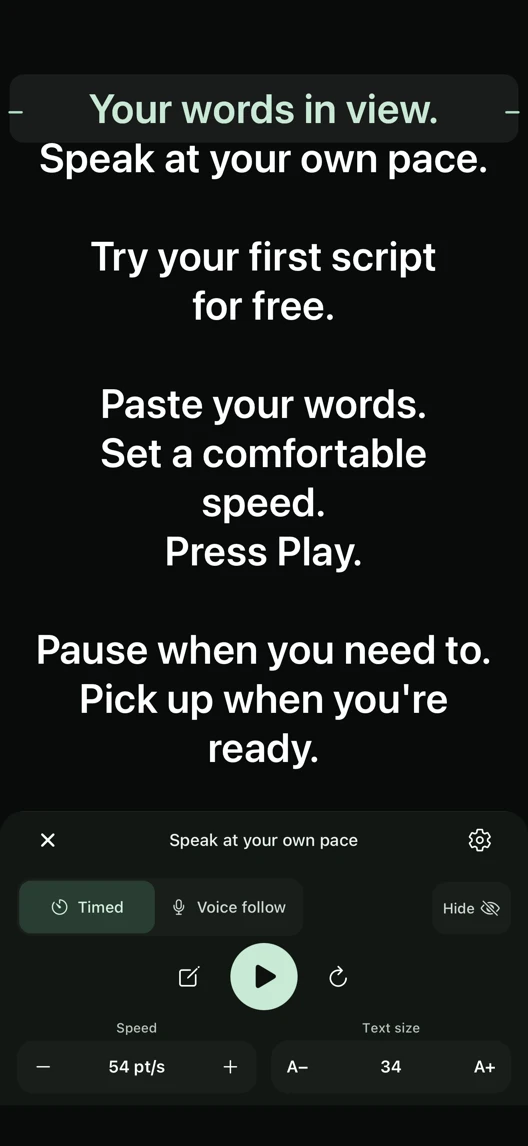
Rollside Prompter update preview showing a script in the dark reader with its reading focus and playback controls
Preview of the upcoming Rollside Prompter update.

Start with three saved scripts. A one-time Pro purchase unlocks unlimited scripts. No subscription.

Make it comfortable to read. Adjust text size, spacing and reading width. Use mirror mode or right-to-left text when you need it.

Your script reader. Prompter helps you rehearse and present; use your camera app or filming setup to record your take.

Your idea.
All the way through.

Capture the moment, find the story, and give it your finishing touch.

ROLLSIDE / IPHONE

Get in the frame.

Use a second iPhone to see your camera’s live preview and control your recording. Give your attention to what you’re making.

WORKFLOW PREVIEWCAPTURE

Why “Rollside”?

Roll, as in “roll camera.” Side, as in a partner by your side. A name for the company you keep while bringing an idea to life.

FOLLOW THE MAKING OF ROLLSIDE

We’re just getting rolling.

Follow the apps as they take shape: behind the scenes, new features and the upcoming Rollside Prompter rebrand and script connection.

@rollside_